Introduction
Running low on resources while trying to upgrade your furnace or train new troops often pushes players to search for Whiteout Survival gift codes. Free rewards from these codes frequently include gems, speedups, and resources that accelerate progress without spending money.
Right now, gift codes change frequently and many redemption methods confuse players, especially on iOS. A code that works today might expire tomorrow, and a redemption step done incorrectly immediately returns an “invalid code” error.
This guide explains the latest working Whiteout Survival gift codes, how to redeem them correctly across platforms, and the common redemption mistakes that prevent players from claiming rewards. Anyone running multiple accounts or farming resources long-term will also discover a practical way to automate gameplay safely.
Latest Working Whiteout Survival Gift Codes
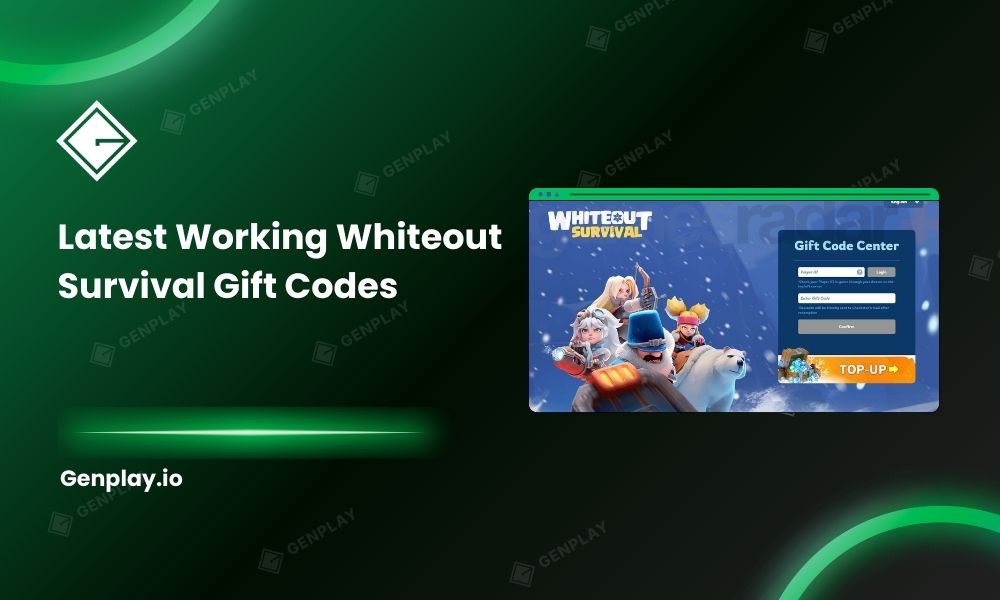
Here the latest Working Whiteout Survival Gift Codes – March 2026 Update:
- WOS3YS
- Blessing
- WOS3ANNIVERSARY
- RamadanJoy2026
- HowieLovesWOS
- gogoWOS
Whiteout Survival gift codes can provide a variety of valuable rewards, such as gems, speedup items, or in-game resources. However, most codes have a very short validity period, so players should redeem them as soon as possible.
How players redeem Whiteout Survival gift codes correctly

Players redeem Whiteout Survival gift codes through three different methods depending on the device and platform restrictions. Android users can redeem directly inside the game, while iOS players must use the official redemption website due to App Store policies.
The redemption process changes based on platform architecture and store rules. Apple restricts certain external reward redemption systems inside mobile games. As a result, the in-game redemption option appears only on Android devices.
Three legitimate redemption paths exist today.
Redeeming through the official redemption website
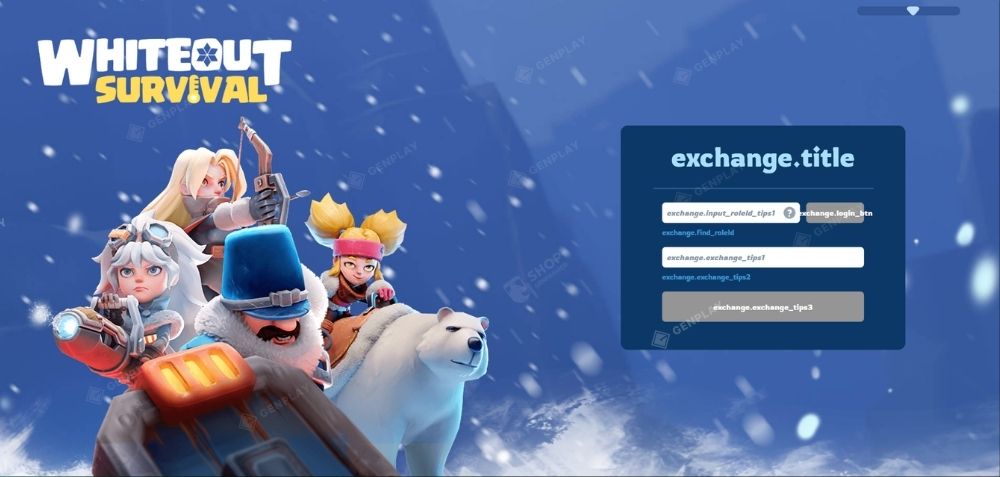
The official redemption website works for both iOS and Android players and remains the most consistent method when the in-game option fails.
Steps to redeem through the website below:
- Open the official Whiteout Survival redemption center
- Enter your Player ID exactly as shown in game settings in first field
- Paste the gift code in second field
- Complete verification if required
- Confirm redemption
Rewards arrive through the in-game mail system within seconds.
Players often overlook the Player ID requirement. Copying the wrong ID or using an alliance ID instead immediately causes an invalid code message. The safest approach is to copy the ID directly from the settings menu rather than typing it manually.
A common scenario illustrates this problem clearly. A player managing three accounts in different alliances tried redeeming a working code but repeatedly received errors. The mistake came from entering the main account ID while attempting redemption for an alternate account.
In general, Correct ID & correct code — rewards arrived instantly.
Redeeming codes inside the game settings (Android only)
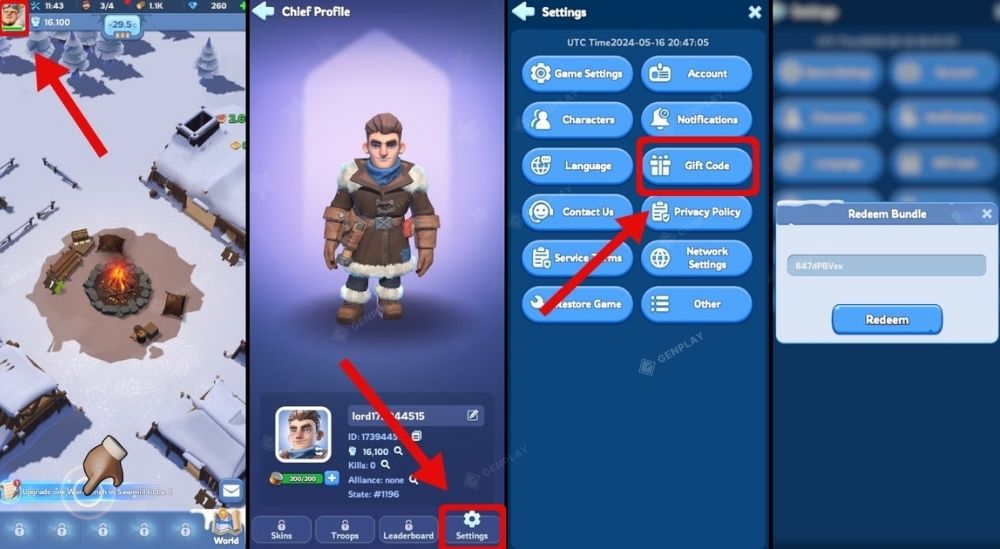
Android players redeem Whiteout Survival codes directly inside the game using the built-in redemption interface.
Steps inside the Android client:
- Open and click the player profile
- Navigate to Settings
- Select the Gift Code option
- Enter the code exactly as written
- Confirm redemption
The reward mail usually arrives immediately.
This method remains the fastest option for players who redeem codes frequently. However, occasional server congestion during global events can slow down the process or trigger temporary rate limits.
Players redeeming multiple codes at once should wait a few seconds between submissions to avoid automated restrictions.
Which redeem method works best for most players

The best redemption method for Whiteout Survival gift codes depends on device platform, but the official redemption website consistently works across all devices. Android players often prefer in-game redemption for speed, while iOS users rely exclusively on the website.
Choosing the correct redemption method reduces error rates dramatically. Each method carries advantages and limitations tied to platform architecture.
In-game redemption vs website redemption
|
Feature |
In-Game Redemption | Website Redemption |
|
Speed |
Faster input |
Slightly slower |
|
Device compatibility |
Android only |
Android + iOS |
|
Error frequency |
Occasional rate limits |
Very stable |
| Convenience | Immediate inside game |
Requires browser |
Website redemption tends to produce fewer technical errors because it bypasses client-side limitations.
Players managing multiple accounts often prefer the website method. Switching between accounts inside the browser interface proves faster than repeatedly logging in and out of the game client.
iOS redemption vs Android redemption
|
Platform |
Redemption Method |
Accessibility |
|
iOS |
Website only |
Moderate |
|
Android |
In-game or website |
Flexible |
Android provides greater flexibility, but both systems ultimately deliver identical rewards.
The critical factor remains accuracy when entering Player ID and codes, not the platform itself.
Hidden problems players face when redeeming codes

Several technical issues prevent players from redeeming Whiteout Survival gift codes, even when the codes remain valid. Most problems originate from platform limitations, input mistakes, or server rate restrictions rather than expired codes.
Understanding these problems saves time and avoids unnecessary troubleshooting.
iOS players can’t redeem codes in-game
iOS users cannot redeem codes directly inside the game interface.
The absence of the redemption button leads many players to believe the feature disappeared or requires a level unlock. Neither explanation is correct.
The reason comes from Apple’s platform rules, which restrict external code redemption inside certain game mechanics. Developers therefore move the process to a web-based redemption center.
Attempting to find the option inside the settings menu always fails on iOS.
The solution remains simple: open the official redemption website and enter the Player ID manually.
“Invalid Code” due to wrong player ID or case sensitivity
An invalid code error often results from incorrect formatting rather than an expired code.
Two common causes appear repeatedly:
- Entering the wrong Player ID
- Changing uppercase or lowercase letters in the code
Gift codes follow strict case sensitivity rules. Typing “WS2024gift” instead of “WS2024GIFT” invalidates the redemption request.
A real example occurred during a seasonal event when players shared a working code in alliance chat. Several members reported failures until someone noticed that the shared message converted the code to lowercase automatically.
Copy-paste from the original source prevents that issue entirely.
Rate Limit “Too Quick” When Redeeming Multiple Codes
The redemption system enforces a rate limit that prevents rapid consecutive submissions.
Submitting several codes within seconds sometimes triggers a temporary block labeled “Too Quick” or “Try Again Later.”
The restriction exists to protect the system from automated abuse.
Waiting 10–15 seconds between redemption attempts solves the problem in most cases. Players redeeming large batches of codes should pace submissions carefully.
Maximize Your Rewards – Farm 24/7 Safely with GenPlay Cloud Phone

It’s time to upgrade to GenPlay — a 100% real-device cloud phone platform from the Gen Ecosystem built for serious performance, proprietary ROM optimization, strong security, true 120 FPS gameplay, and high ROI with full game compatibility.
Developed by GenFarmer – Leading Vietnamese Technology
GenPlay is fully developed in Vietnam by the GenFarmer team — the company behind recognized platforms such as GenLogin, Box Phone, GenRouter, and Package.
With over three years of R&D, GenPlay became Vietnam’s first physical cloud phone infrastructure, built to compete directly with large-scale providers in Asia.
This is not a resold virtualization service. It’s vertically integrated hardware infrastructure designed in-house.
100% Real Performance – Independent Snapdragon Chips, Smooth 120 FPS 24/7
Unlike virtualized cloud phones:
- Every GenPlay device is a real Android phone
- No virtualization layer
- Dedicated CPU, RAM, and GPU — no shared resources
- Powered by Snapdragon chips for stable high performance
- Up to 120 FPS with high resolution and near-zero latency
The result: Gameplay that feels identical to using a physical phone in your hand.
No Bans, High Security – Custom ROM + Dedicated Proxy
GenPlay runs on a custom-built ROM developed by GenFarmer, optimized to reduce emulator detection risks.
- Recognized as real devices by games
- Reduced account lock or suspension risk
- Dedicated proxy per device
- IP, language, and timezone aligned like a local device
- Full compatibility across mobile games
Unlike virtual environments that may trigger detection layers, GenPlay operates at the hardware level.
Market-Competitive Pricing – Multiples in Performance
GenPlay offers pricing comparable to — or lower than — many virtual cloud phone services, while delivering significantly higher performance.
- No large upfront hardware purchase
- Monthly subscription flexibility
- Scale up during events, scale down when not needed
- Pay only for what you run
It’s built for operational flexibility without heavy capital investment.
24/7 Continuous Operation – No Overheating, No Battery Degradation
GenPlay’s hardware and cloud infrastructure are optimized for long-term continuous operation.
- Minimized disconnects, lag, and crashes
- Designed for AFK, MMO, and automation workflows
- No overheating issues
- No battery degradation like home physical devices
- Account settings saved instantly without repeated setup
Run day and night without babysitting your devices.
Try GenPlay Now!
🎮Farm comfortably. Run AFK with confidence. GenPlay handles the infrastructure!
- Sign up via the App or Join our Discord community to receive free trial promotions.
- Download GenPlay on Google Play.

GenPlay Social Hub
- Fanpage: https://www.facebook.com/genplayvietnam
- Group: https://www.facebook.com/groups/genplayvietnam
- YouTube: https://www.youtube.com/@GenPlayOfficial
- Telegram: https://t.me/GenPlayVNOfficial
If you’re unsure where to begin, CONTACT GENPLAY TEAM, we’re ready to help you build a stable, scalable setup.