

1. Set Up Your GenPlay Cloud Phone
Step 1: Visit Genplay and log in to your account.
Step 2: Create a Cloud Phone to run Roblox.
If you don't have a device yet, check out: How to Buy and Renew a Cloud Phone on GenPlay.
Step 3: Open your Cloud Phone and prepare to install the game.
2. Install DeltaX and Launch Adopt Me!
Step 1: Download and install DeltaX on your Cloud Phone.
Step 2: Open DeltaX and log in to your Roblox account.
Step 3: Search for Adopt Me! on Roblox and join the game.
3. Add the Adopt Me! Auto Farm Script
Step 1: Once you're in Adopt Me!, open the DeltaX script executor.
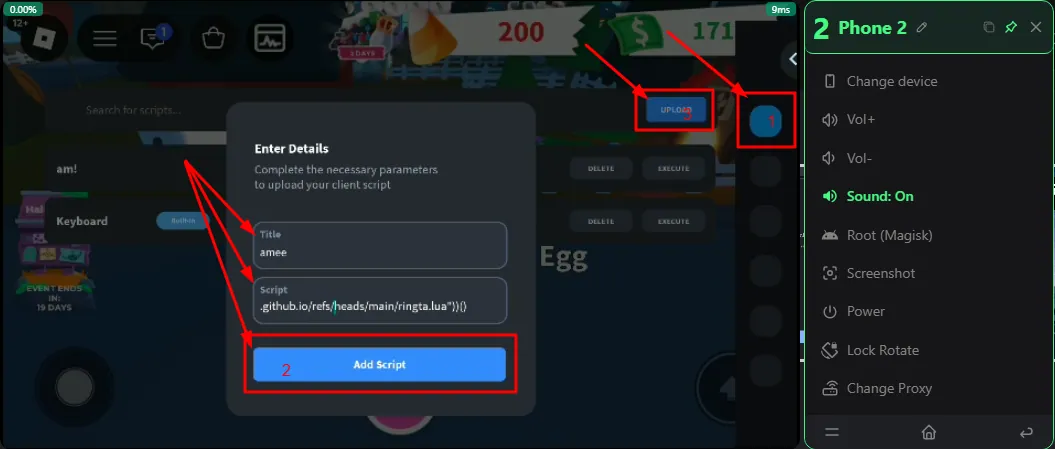
Step 2: Tap Upload to add a new script.
Step 3: Enter a script name (e.g., adoptme) and paste the following code into the Script field:
loadstring(game:HttpGet("https://raw.githubusercontent.com/eeeiqjj876y/adoptme.github.io/refs/heads/main/ringta.lua"))()Step 4: Tap Add Script to save the script.
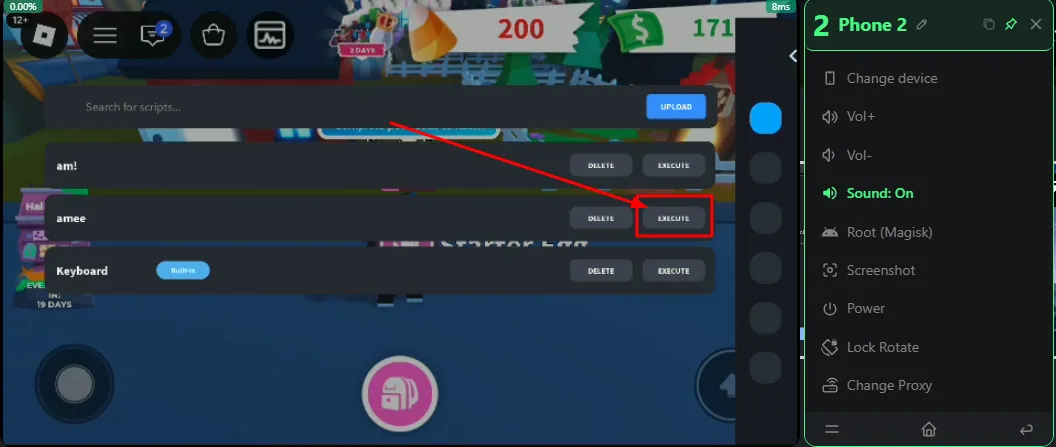
Step 5: Find adoptme in your script list and tap Execute to run it.
Once the script loads successfully, the Auto Farm control panel will appear in Adopt Me!.
4. Enable Baby/Pet Auto Farm in Adopt Me!
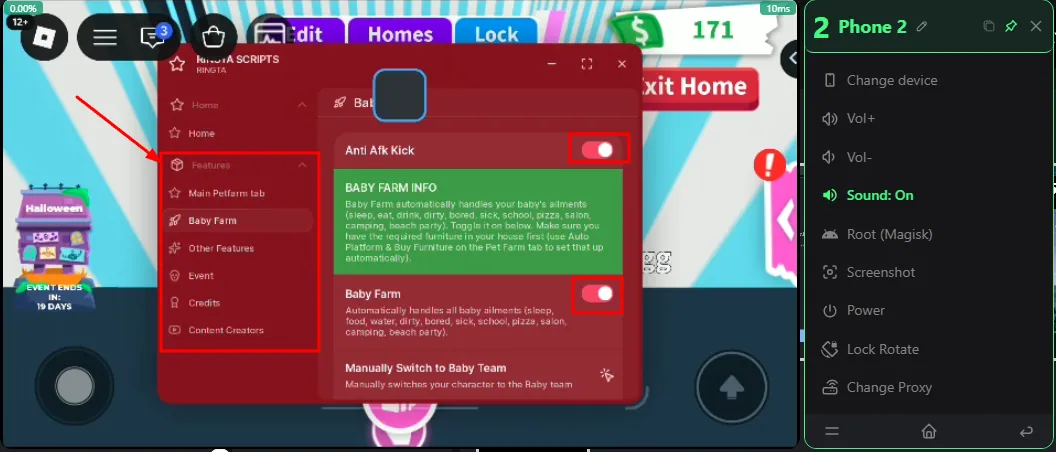
Open the script menu and select the features you want to use:
Autofarm Baby or Pet: Automatically completes Baby or Pet care tasks to age up your pets.
Auto Hatch Eggs: Automatically purchases and hatches eggs from the Nursery.
Anti AFK: Helps prevent disconnection due to inactivity during long farming sessions.
Buy Any Items: Automatically purchases items, pets, or vehicles from in-game shops.
Auto Give Cash to Player: Automatically transfers in-game currency to another player.
Auto Lure: Automatically uses lures to attract pets or obtain items.
Auto Claim Quests: Automatically accepts and completes daily quests to collect rewards.
Recommended Settings: Enable Autofarm Baby or Pet together with Anti AFK for extended farming sessions. You can also enable Auto Hatch Eggs and Auto Claim Quests depending on your needs.
Note: Automatic purchases and cash transfers may consume your in-game resources. Check your settings before enabling these features.
5. Run Adopt Me! AFK 24/7 on GenPlay
After configuring the script:
Make sure all enabled Auto Farm features are working correctly.
Keep Roblox and Adopt Me! running on your Cloud Phone.
Close the GenPlay control interface on your phone or computer.
Adopt Me! can continue running on your Cloud Phone after you disconnect from the control interface, as long as the cloud device and game remain active.
You can reconnect to GenPlay anytime to check your Baby/Pet farming progress.
GenPlay Cloud Phone lets you run Adopt Me!, care for pets, and perform in-game activities on a cloud device without keeping your personal phone turned on continuously.
Join the GenPlay Discord to claim a free trial device, or email [email protected].