

1. Set Up Your GenPlay Cloud Phone
Step 1: Visit Genplay and log in to your account.
Step 2: Create a Cloud Phone to run Roblox.
If you don't have a device yet, check out: How to Buy and Renew a Cloud Phone on GenPlay.
Step 3: Open your Cloud Phone and prepare to install the game.
2. Install DeltaX and Launch Brookhaven RP
Step 1: Download and install DeltaX on your Cloud Phone.
Step 2: Open DeltaX and log in to your Roblox account.
Step 3: Search for Brookhaven RP on Roblox and join the game.
3. Add the Brookhaven RP Auto Farm Script
Step 1: Once you're in Brookhaven RP, open the DeltaX script executor.
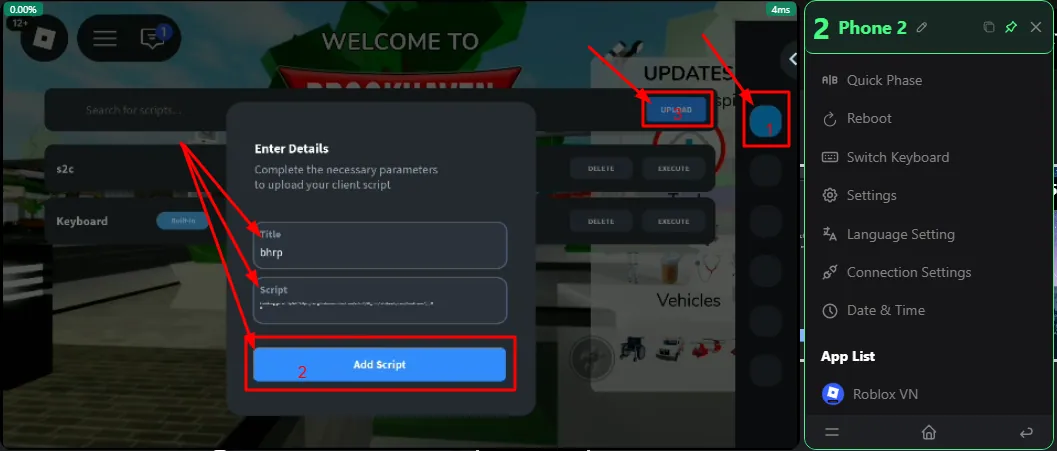
Step 2: Tap Upload to add a new script.
Step 3: Enter a script name (e.g., bhrp) and paste the following code into the Script field:
loadstring(game:HttpGet("https://raw.githubusercontent.com/as6cd0/SP_Hub/refs/heads/main/Brookhaven"))()Step 4: Tap Add Script to save the script.
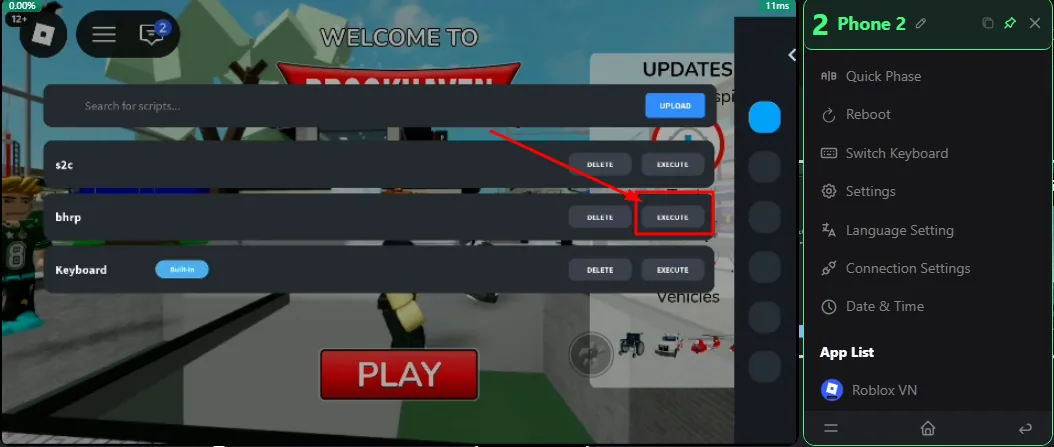
Step 5: Find bhrp in your script list and tap Execute to run it.
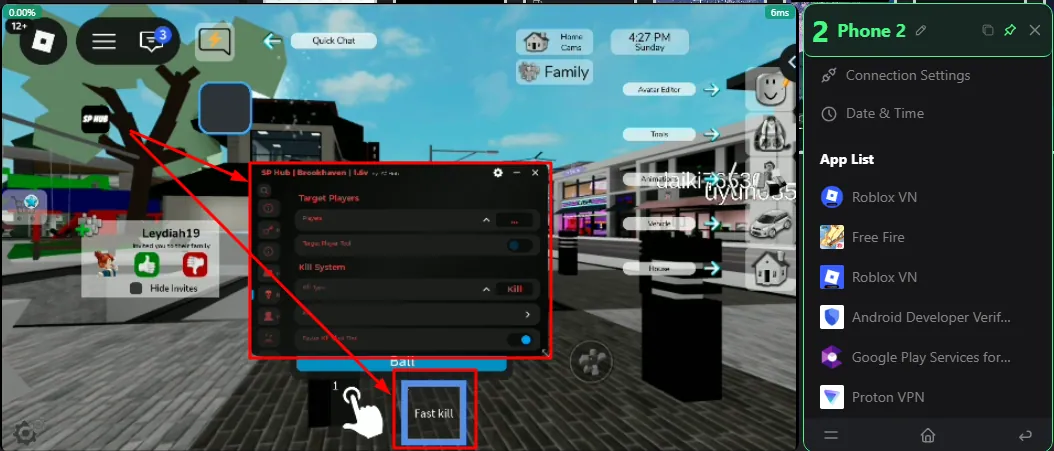
Once the script loads successfully, the SP Hub interface will appear in Brookhaven RP.
4. Use SP Hub Features in Brookhaven RP
Open the SP Hub menu and select the available features:
Auto Collect: Automatically collects items.
House Customization: Helps customize houses.
Kill System / Fast Kill: Provides automated targeting and attack-related functions.
Troll Features: Offers interaction and trolling features involving other players.
Server Tools: Helps switch between different game servers.
Teleport / Navigation: Provides quick transportation and map navigation.
Gamepass Features: Includes certain utilities related to Gamepass functionality.
Feature names and availability may vary depending on the script version.
Note: Brookhaven RP is primarily a role-playing game and does not have a traditional currency farming system like many Roblox simulator games. The script automates certain actions but does not guarantee in-game earnings or unlock paid Gamepasses.
5. Run Brookhaven RP AFK 24/7 on GenPlay
After configuring the script:
Enable the features you want to use in SP Hub.
Make sure the script is working correctly in Brookhaven RP.
Keep Roblox running on your Cloud Phone and close the GenPlay control interface.
Brookhaven RP can continue running on your Cloud Phone even after you turn off your personal phone or computer, as long as the cloud device and game remain active.
You can reconnect to GenPlay anytime to check your game status.
GenPlay Cloud Phone lets you run Brookhaven RP on a cloud device without keeping your personal phone turned on continuously.
Join the GenPlay Discord to claim a free trial device, or email [email protected].